|
Bronco, 2021-2024
| Onboard Proxfob programming (ADD only) |
| Maximum 4 proxfobs |
| Notes |
- The vehicle must be off.
- All doors must be closed before beginning and they must remain closed throughout the procedure.
- Perform all steps within 30 seconds of starting the sequence.
- Stop and wait for at least one minute before starting again if you perform any steps out of sequence.
|
Backup Slot is in the console 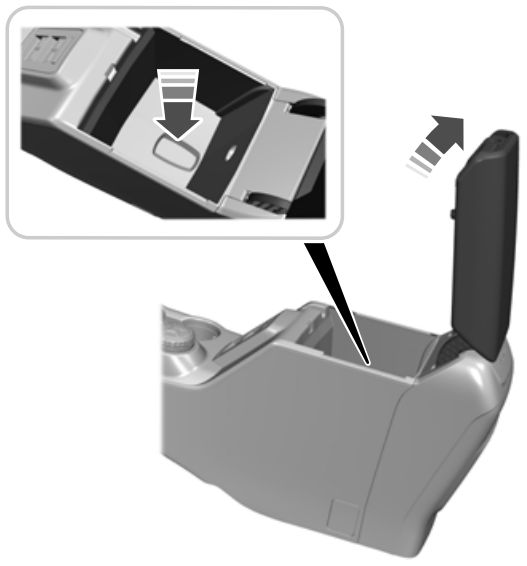 |
- Place the first programmed prox in the backup slot. Press and release the START button.
- Wait five seconds and then press and release the START button again.
- Remove the proxfob.
- Within 10 seconds, place the second programmed prox in the slot. Press and release the START button.
- Wait five seconds and then press and release the START button again. Press at least 3 seconds, but no more than 10 seconds.
- Remove the proxfob.
- Place the new proxfob in the slot and press and release the START button.
Programming is now complete. Test prox. If programming was not successful, wait 10 seconds and repeat Steps 1 through 7. |
xxxx
xxxx
xxxx
xxxx
xxxx
xxxx
xxxx
xxxx
xxxx
xxxx
xxxx
xxxx
xxxx
xxxx
xxxx
xxxx
xxxx
xxxx
xxxx
Ford 1
| Note: Maximum 8 remotes. |
| Ford OBP #1 |
- Close doors. Open driver's door. Press the UNLOCK switch.
- Cycle ignition OFF-RUN 8 times. (Locks cycle)
- Press any button on fob (Locks cycle). Repeat for additional.
- Turn ignition OFF to exit programming (Locks cycle).
|
| Note: Most cars don't require Step 1. But some are particular! |
Ford 2
| Note: Maximum 4 remotes. |
| Ford OBP #2 |
- Cycle ignition OFF-RUN 4 times within 6 seconds. (4th time ends in RUN)
- Turn ignition OFF. (chime sounds)
- Press any remote button. (chime sounds) Repeat for additional remotes, if any.
- Turn ignition to RUN to exit programming.
|
Ford 3
| Note: Maximum two remotes. |
| Ford OBP #3 |
- Cycle ignition OFF-RUN 5 times within 10 seconds (5th time ends in RUN). The locks will cycle.
- Press any remote button. The locks will cycle. Repeat for a second remote, if any.
- Turn ignition OFF to exit program mode. The locks will cycle.
- Test remote(s).
|
Ford 4
| Note: Maximum two remotes. |
| Ford OBP #4 |
- Enter the 5-digit factory code into the keypad.
- Within 5 seconds, press the 1/2 button. The locks will cycle.
- Press any remote button within 5 seconds. The locks will cycle. Repeat for a second remote, if any.
- Press the 7/8 and the 9/0 buttons simultaneously to exit program mode.
If the keypad light goes out before all remotes are programmed, the entire process must be repeated.
|
Ford 5
| Ford OBP #5 |
| Note: Maximum two remotes. |
| Ford 5 |
- Drop the glove box and locate the Programming Connector behind it. It will be a plastic connector with two wires running from it and it will not be connected to anything. No connector? Not equipped with keyless entry.
- Turn ignition to RUN or ACC.
- Momentarily jump the pins in the programming connector. The locks will cycle.
- Press any remote button. The locks will cycle. Repeat for a second remote, if any.
- Turn ignition OFF to exit program mode. The locks will cycle.
|
| Ford 5.1 |
- Locate the Programming Connector in the left rear quarter panel area. It will be a plastic connector with two wires running from it and it will not be connected to anything. No connector? Not equipped with keyless entry.
- Turn ignition to RUN or ACC.
- Momentarily jump the pins in the programming connector. The locks will cycle.
- Press any remote button. The locks will cycle. Repeat for a second remote, if any.
- Turn ignition OFF to exit program mode. The locks will cycle.
|
| Ford 5.2 |
- Locate the Programming Connector at the base of the steering column. It will be a plastic connector with two wires running from it and it will not be connected to anything. No connector? Not equipped with keyless entry.
- Turn ignition to RUN or ACC.
- Momentarily jump the pins in the programming connector. The locks will cycle.
- Press any remote button. The locks will cycle. Repeat for a second remote, if any.
- Turn ignition OFF to exit program mode. The locks will cycle.
|
Ford 6
| Note: Maximum two remotes. |
| Ford OBP #6 |
- Locate the Programming Connector -- it will come out of a large harness which runs under the column at the bottom edge of the dash. The Programming Connector will not be connected to anything. It will be a black plastic connector with two wires running from it, a white wire with a yellow stripe, and a gray wire with a yellow stripe. No connector? Not equipped with keyless entry.
- Turn ignition to RUN or ACC.
- Jump the pins in the programming connector. The locks will cycle.
- Press any remote button. The locks will cycle. Repeat for a second remote, if any.
- Turn ignition OFF to exit program mode. The locks will cycle.
- Remove the jumper wire from the programming connector.
|
|