|
Enclave, 2018-2024
| Note: Minimum 2 proxfobs, maximum 8 |
| Programming with 2 Recognized Proxfobs |
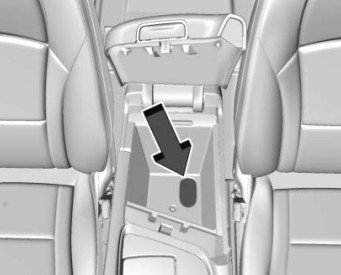
- Remove the rubber mat in the center console to find the transmitter pocket.
- Place the two known proxfobs in the cupholder.
- Cycle the driver's door lock counterclockwise (unlock) 5 times within 10 seconds.
The Driver Information Center (DIC) displays READY FOR REMOTE #.
- Place the new proxfob in the pocket.
- Press the START button. When the prox is learned, the DIC will show it is ready for the next one.
- Remove the prox from the pocket and press UNLOCK or LOCK on the prox.
To program more, repeat Steps 4-6.
Press/Hold the START button for about 12 seconds to exit programming mode.
|
 |
| Programming without 2 Recognized Proxfobs |
| Note: Requires 2 proxfobs to be present |
- Remove the rubber mat in the center console to find the transmitter pocket.
- Cycle the driver's door lock counterclockwise (unlock) 5 times within 10 seconds.
The Driver Information Center (DIC) displays REMOTE LEARN PENDING, PLEASE WAIT.
- Wait 10 minutes until the DIC displays PRESS ENGINE START BUTTON TO LEARN, then press the START button.
The DIC will again show REMOTE LEARN PENDING, PLEASE WAIT.
- Repeat Step 3 two additional times.
The DIC display should now show READY FOR REMOTE # 1.
- Place the new proxfob in the pocket.
- Press the START button. When the prox is learned, the DIC will show that it is ready for the next one.
- Remove the prox from the pocket and press UNLOCK or LOCK on the prox.
To program more, repeat Steps 5–7.
Press/Hold the START button for about 12 seconds to exit programming mode.
|
| End Enclave, 2018-2024 |
Encore, 2017-2022
| Note: 8 proxfobs maximum |
| Programming with 2 Recognized Proxfobs |
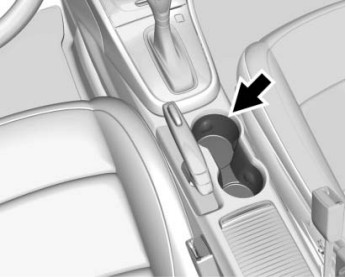
- Place the two known proxfobs in the front cupholder.
- Cycle the driver's door lock counterclockwise (unlock) 5 times within 10 seconds.
The Driver Information Center (DIC) displays READY FOR REMOTE #.
- Remove the two known proxfobs from the cupholder.
- Place the new proxfob in the cupholder.
- Press the START button. When the prox is learned, the DIC will show it is ready for the next one.
- Remove the prox from the cupholder and press UNLOCK on the prox.
To program more, repeat Steps 4-6.
Press/Hold the START button about 10 seconds to exit programming mode.
|  |
| Programming without 2 Recognized Proxfobs |
| Note: Requires 2 proxfobs to be present |
- Cycle the driver's door lock counterclockwise (unlock) 5 times within 10 seconds.
The Driver Information Center (DIC) displays REMOTE LEARN PENDING, PLEASE WAIT.
- Wait 10 minutes until the DIC displays PRESS ENGINE START BUTTON TO LEARN, then press the START button.
The DIC will again show REMOTE LEARN PENDING, PLEASE WAIT.
- Repeat Step 3 two additional times.
The DIC display should now show READY FOR REMOTE # 1.
- Place the new proxfob in the front cupholder.
- Press the START button. When the prox is learned, the DIC will show that it is ready for the next one.
- Remove the prox from the pocket and press UNLOCK on the prox.
To program more, repeat Steps 4–6.
Press/Hold the START button about 10 seconds to exit programming mode.
|
| End Encore, 2017-2022 |
Encore GX, 2020-2024
| Note: Minimum 2 proxfobs, maximum 8 |
| Programming with 2 Recognized Proxfobs |
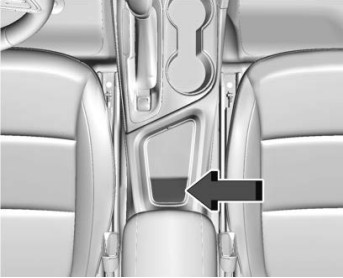
- Place the two known proxfobs in the transmitter pocket.
- Cycle the driver's door lock counterclockwise (unlock) 5 times within 10 seconds.
The Driver Information Center (DIC) displays READY FOR REMOTE #.
- Remove the two known proxfobs from the pocket.
- Place the new proxfob in the pocket.
- Press the START button. When the prox is learned, the DIC will show it is ready for the next one.
- Remove the prox from the pocket and press UNLOCK or LOCK on the prox.
To program more, repeat Steps 4-6.
Press/Hold the START button about 12 seconds to exit programming mode.
|  |
| Programming without 2 Recognized Proxfobs |
| Note: Requires 2 proxfobs to be present |
- Cycle the driver's door lock counterclockwise (unlock) 5 times within 10 seconds.
The Driver Information Center (DIC) displays REMOTE LEARN PENDING, PLEASE WAIT.
- Wait 10 minutes until the DIC displays PRESS ENGINE START BUTTON TO LEARN, then press the START button.
The DIC will again show REMOTE LEARN PENDING, PLEASE WAIT.
- Repeat Step 3 two additional times.
The DIC display should now show READY FOR REMOTE # 1.
- Place the new proxfob in the pocket.
- Press the START button. When the prox is learned, the DIC will show that it is ready for the next one.
- Remove the prox from the pocket and press UNLOCK or LOCK on the prox.
To program more, repeat Steps 4-6.
Press/Hold the START button about 12 seconds to exit programming mode.
|
| End Encore GX, 2020-2024 |
Envision, 2016-2020
| Note: Maximum 8 proxfobs. 2016 is the same procedure, but only 1 prox is required |
| Programming with 2 Recognized Proxfobs |
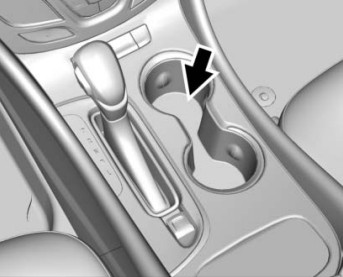
- Place the known proxfobs in the front cupholder.
- Cycle the driver's door lock counterclockwise (unlock) 5 times within 10 seconds.
The Driver Information Center (DIC) displays READY FOR REMOTE #.
- Remove the known proxfobs from the cupholder.
- Place the new proxfob in the cupholder.
- Press the START button. When the prox is learned, the DIC will show it is ready for the next one.
- Remove the prox from the cupholder and press UNLOCK on the prox.
To program more, repeat Steps 4-6.
Press/Hold the START button about 12 seconds to exit programming mode.
|  |
| Programming without 2 Recognized Proxfobs |
- Cycle the driver's door lock counterclockwise (unlock) 5 times within 10 seconds.
The Driver Information Center (DIC) displays REMOTE LEARN PENDING, PLEASE WAIT.
- Wait 10 minutes until the DIC displays PRESS ENGINE START BUTTON TO LEARN, then press the START button.
The DIC will again show REMOTE LEARN PENDING, PLEASE WAIT.
- Repeat Step 3 two additional times.
The DIC display should now show READY FOR REMOTE # 1.
- Place the new proxfob in the front cupholder.
- Press the START button. When the prox is learned, the DIC will show that it is ready for the next one.
- Remove the prox from the pocket and press UNLOCK on the prox.
To program more, repeat Steps 4–6.
Press/Hold the START button about 12 seconds to exit programming mode.
|
| End Envision, 2016-2020 |
Envista, 2024-2024
| Note: Minimum 2 proxfobs, maximum 8 |
| Programming with 2 Recognized Proxfobs |
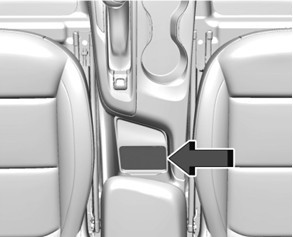
- Place the two known proxfobs in the transmitter pocket.
- Cycle the driver's door lock counterclockwise (unlock) 5 times within 10 seconds.
The Driver Information Center (DIC) displays READY FOR REMOTE #.
- Remove the two known proxfobs from the pocket.
- Place the new proxfob in the pocket.
- Press the START button. When the prox is learned, the DIC will show it is ready for the next one.
- Remove the prox from the pocket and press UNLOCK or LOCK on the prox.
To program more, repeat Steps 4-6.
Press/Hold the START button about 12 seconds to exit programming mode.
|  |
| Programming without 2 Recognized Proxfobs |
| Note: Requires 2 proxfobs to be present |
- Cycle the driver's door lock counterclockwise (unlock) 5 times within 10 seconds.
The Driver Information Center (DIC) displays REMOTE LEARN PENDING, PLEASE WAIT.
- Wait 10 minutes until the DIC displays PRESS ENGINE START BUTTON TO LEARN, then press the START button.
The DIC will again show REMOTE LEARN PENDING, PLEASE WAIT.
- Repeat Step 3 two additional times.
The DIC display should now show READY FOR REMOTE # 1.
- Place the new proxfob in the transmitter pocket.
- Press the START button. When the prox is learned, the DIC will show that it is ready for the next one.
- Remove the prox from the pocket and press UNLOCK or LOCK on the prox.
To program more, repeat Steps 4-6.
Press/Hold the START button about 12 seconds to exit programming mode.
|
| End Envista, 2024-2024 |
LaCrosse, 2010-2016
| Note: 2010-2013: 5 Maximum; 2014-2016: 8 Maximum |
| Programming with a Recognized Proxfob |
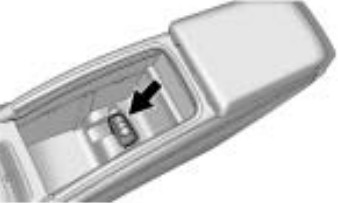
- Open the center console and remove the cupholder to find the transmitter pocket (see image).
- Place the recognized proxfob in the cupholder.
- Use the eKey to turn the driver's door lock counterclockwise (unlock) 5 times within 10 seconds.
The Driver Information Center (DIC) displays READY FOR REMOTE #.
- Place the new proxfob in the transmitter pocket.
- Press the START button. When the prox is learned, the DIC will show it is ready for the next one.
- Remove the prox from the pocket and press UNLOCK on the prox.
To program additional proxfobs, repeat Steps 4-6.
When done, press and hold the START button for approximately 10 seconds to exit programming mode.
|
 |
| Programming without a Recognized Proxfob |
| Note: This procedure will take approximately 30 minutes to complete. |
- Open the center console and remove the cupholder to find the transmitter pocket (see image above).
- Use the eKey to turn the driver's door lock counterclockwise (unlock) 5 times within 10 seconds.
The Driver Information Center (DIC) displays REMOTE LEARN PENDING, PLEASE WAIT.
- Wait 10 minutes until the DIC displays PRESS ENGINE START BUTTON TO LEARN, then press the START button.
The DIC will again show REMOTE LEARN PENDING, PLEASE WAIT.
- Repeat Step 3 two additional times. After the third time all previously known proxfobs will no longer work.
The DIC display should now show READY FOR REMOTE # 1.
- Place the new proxfob in the transmitter pocket.
- Press the START button. When the prox is learned, the DIC will show that it is ready for the next one.
- Remove the prox from the pocket and press UNLOCK on the prox.
To program additional proxfobs, repeat Steps 5–7.
When done, press and hold the START button for approximately 10 seconds to exit programming mode.
|
LaCrosse, 2017-2019
| Note: Minimum 2 proxfobs, maximum 8 |
| Programming with 2 Recognized Proxfobs |
- Place the two known proxfobs in the cupholder.
- Cycle the driver's door lock counterclockwise (unlock) 5 times within 10 seconds.
The Driver Information Center (DIC) displays READY FOR REMOTE #.
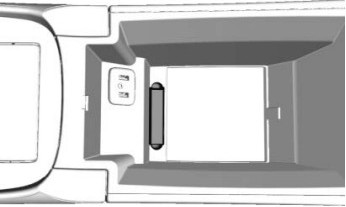
- Place the new proxfob in the proxfob pocket inside the center console.
- Press the START button. When the prox is learned, the DIC will show it is ready for the next one.
- Remove the prox from the cupholder and press UNLOCK on the prox.
To program more, repeat Steps 3-5.
Press/Hold the START button about 12 seconds to exit programming mode.
|  |
| Programming without 2 Recognized Proxfobs |
| Note: Requires 2 proxfobs to be present |
- Cycle the driver's door lock counterclockwise (unlock) 5 times within 10 seconds.
The Driver Information Center (DIC) displays REMOTE LEARN PENDING, PLEASE WAIT.
- Wait 10 minutes until the DIC displays PRESS ENGINE START BUTTON TO LEARN, then press the START button.
The DIC will again show REMOTE LEARN PENDING, PLEASE WAIT.
- Repeat Step 3 two additional times.
The DIC display should now show READY FOR REMOTE # 1.
- Place the new proxfob in the proxfob pocket inside the center console.
- Press the START button. When the prox is learned, the DIC will show that it is ready for the next one.
- Remove the prox from the pocket and press UNLOCK on the prox.
To program more, repeat Steps 4–6.
Press/Hold the START button about 12 seconds to exit programming mode.
|
| End LaCrosse, 2017-2019 |
Regal, 2018-2020
| Note: Minimum 2 proxfobs, maximum 8 |
| Programming with 2 Recognized Proxfobs |
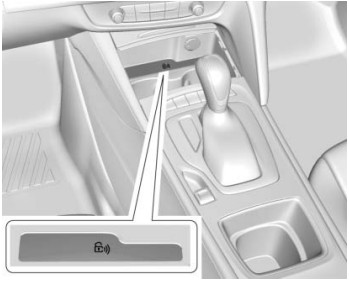
- Place the known proxfobs into the storage bin with the lock icon (see image).
- Cycle the driver's door lock counterclockwise (unlock) 5 times within 10 seconds.
The Driver Information Center (DIC) displays READY FOR REMOTE #.
- Place the new proxfob into the storage bin with the buttons facing up.
- Press the START button. When the prox is learned, the DIC will show it is ready for the next one.
- Remove the prox from the storage bin and press UNLOCK on the prox.
To program more, repeat Steps 3–5.
Press/Hold the START button about 12 seconds to exit programming mode.
|  |
| Programming without 2 Recognized Proxfobs |
| Note: Requires 2 proxfobs to be present |
- Cycle the driver's door lock counterclockwise (unlock) 5 times within 10 seconds.
The Driver Information Center (DIC) displays REMOTE LEARN PENDING, PLEASE WAIT.
- Wait 10 minutes until the DIC displays PRESS ENGINE START BUTTON TO LEARN, then press the START button.
The DIC will again show REMOTE LEARN PENDING, PLEASE WAIT.
- Repeat Step 2 two additional times.
The DIC display should now show READY FOR REMOTE # 1.
- Place the new proxfob into the storage bin with the lock icon with the buttons facing up.
- Press the START button. When the prox is learned, the DIC will show that it is ready for the next one.
- Remove the prox from the storage bin and press UNLOCK on the prox.
To program more, repeat Steps 4–6.
Press/Hold the START button about 12 seconds to exit programming mode.
|
| End Regal, 2018-2020 |
GM 1 Onboard
| Note: Eight remotes maximum |
| With the DIC: |
Turn ignition ON
Press DIC info button to:
· PRESS TO RELEARN REMOTE KEY
Press DIC Checkmark to:
· REMOTE KEY LEARNING ACTIVE
Press & hold LOCK & UNLOCK together
· (about 15 seconds, soft chirp for success)
Repeat step 4 for additional fobs, if any
Turn ignition OFF to exit programming
|
| Without the DIC: |
Turn ignition ON
Press the odometer reset to:
· RELEARN REMOTE KEY
Press & hold odometer reset button to:
· REMOTE KEY LEARNING ACTIVE
Press & hold LOCK & UNLOCK together
· (about 15 seconds, soft chirp for success)
Repeat for additional fobs, if any
Turn ignition OFF to exit programming
|
| End 1 |
GM 2 Onboard
Close all doors, key in the ignition
Hold down the door UNLOCK switch
Quickly turn the ignition ON, OFF, ON, OFF.
Release the UNLOCK switch (locks should cycle)
· If locks begin to cycle before you release the switch, wait to release it until after locks cycle
Press & hold LOCK & UNLOCK togather
· (about 30 seconds, until locks cycle)
Repeat for additional fobs, if any
Turn ignition ON to exit programming
|
| End 2 |
GM 2.2 Onboard
Close all doors
Turn ignition ON-OFF, then remove key
Hold down the door UNLOCK switch
Put key in ignition, then take key out 2 times
Put key in the ignition
Release UNLOCK switch
· (three beeps = in programming mode)
Press & hold LOCK & UNLOCK togather
· (about 15 seconds, until 2 beeps)
Repeat for additional fobs, if any
Remove key from ignition to exit programming
|
| End 2.2 |
GM 9.2 Onboard
| OBP Method GM 9.2 |
| Note: A maximum of 4 remotes may be programmed into these vehicles. |
- Open the door & put the key in the ignition.
- Locate the OBD Port and jump pin 8 to pin 4.
- Close all doors.
- Turn the ignition to the ON position.
The locks should cycle.
- Press and hold both LOCK and UNLOCK buttons for up to 15 seconds.
The locks will cycle when fob programs.
· Repeat for additional remotes.
- Remove the jumper wire and turn ignition OFF.
|
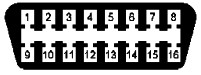 |
| Tip: A bent paper clip is the perfect jump wire. |
| End 9.2 |
|