|
ATS, 2013-2019
| Note: Maximum 8 proxfobs. For 2017+ vehicles, 2 proxfobs are required. Same procedure. |
| With a Recognized Prox |
- Recognized proxfob(s) in the cupholder.
- Turn the door lock cylinder to the unlock position 5 times within 10 seconds.
The DIC shows READY FOR REMOTE #.
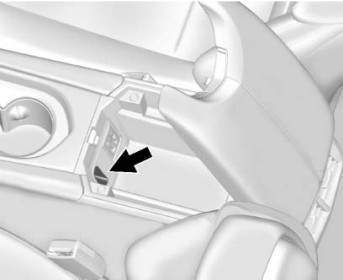
- Place the new prox into the pocket in the center console.
- Press the START button. When the prox is learned, the DIC will show that it is ready to program the next prox.
- Remove the prox from the pocket and press UNLOCK.
To program more, repeat Steps 3-5.
When done, press and hold the START button for 12 seconds to exit programming. |
 |
| Without a Recognized Prox |
- Turn the door lock cylinder to the unlock position 5 times within 10 seconds.
The Driver Information Center (DIC) shows REMOTE LEARN PENDING, PLEASE WAIT.
- Wait 10 minutes until the DIC shows PRESS ENGINE START BUTTON TO LEARN and then press the START button.
The DIC will again show REMOTE LEARN PENDING, PLEASE WAIT.
- Repeat Step 2 two additional times. The DIC display should now show READY FOR REMOTE # 1.
- Place the new prox into the pocket in the center console.
- Press the START button. When the prox is learned the DIC will show that it is ready to program the next prox.
- Remove the prox from the pocket and press UNLOCK.
To program more, repeat Steps 4-6.
When done, press and hold the START button for 12 seconds to exit programming. |
Catera Key
| System Information: Cadillac Catera (Requires ADS-100, Black (A) Dongle) |
Security: 4 digit PIN required. PIN read possible.
Keys: Must be factory key / OEM chip.
Number of keys: 8 Maximum
Components Matched? IMMO & PCM are matched. No matching capability.
|
| Available Functions |
CLEAR KEYS: Clears all keys from the system.
PROGRAM KEYS: Programs keys into the system.
READ PINCODE: Reads PIN Code.
|
| Procedure Notes |
You will need the PIN Code first. Once you have the PIN Code, you will need to clear all keys before you can program keys.
The READ PIN function works most of the time, but ONLY if a spare key has ever been programmed into the car.
After the keys are Cleared/Erased, you will be returned to the Key Menu. Now you will need to program keys.
If the wrong PIN is entered, the process is interrupted. After 3 wrong attempts, the ECU will lock and stay locked for 10 minutes.
You must leave the key ON for at least 10 minutes to unlock the system.
|
| Tips |
- The PIN CODE might appear as a VATS code when they look it up at the dealership.
- The Security Light should be out at the end of the procedure. If it blinks or comes on steady the key has not been accepted.
|
| How To READ PINCODE: |
To read the PIN code go to:
GM USA > IMMOBILISER > BY VEHICLE > CADILLAC > CATERA > SPECIAL FUNCTIONS > READ PINCODE |
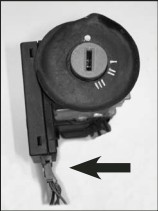
Follow the screen prompts. When you are prompted to DISCONN. IMMO UNIT FROM THE VEHICLE,
then disconnect the Blue connector that goes into the Immobilizer Control Unit on the steering column (as shown) and then press enter on the tester.
Continue following the screen prompts. When you are prompted to RESCONN. IMMO UNIT TO THE VEHICLE, then reconnect the Blue connector you disconnected earlier.
|
NOTE: If you are unable to read the PIN Code, disconnect the tester and remove the key. Wait 2 minutes and try the procedure again.
WARNING: This does not work on every car. If you cannot read the PIN, you will have to get it from a GM dealer or thru NASTF.
|
CT4, 2020-2021
| Note: A new prox can be programmed when there are 2 recognized proxfobs. |
| With Recognized Proxfobs: |
- Place the two recognized proxfobs on the passenger seat.
- Scroll the DIC menu to "Remote Key Relearn" and select.
The DIC shows READY FOR REMOTE #.
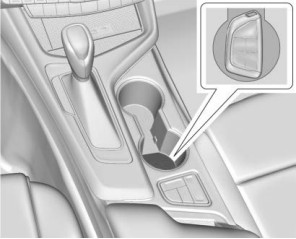
- Place the new prox into the rear cupholder.
- Press ENGINE START/STOP.
When the key is learned the DIC will show that it is ready to program the next.
- Remove the prox from the cupholder and press LOCK or UNLOCK on the prox.
To program more, repeat Steps 4–5.
|
| When finished, press and hold the START button for 12 seconds to exit programming mode. |
 |
CT5, 2020-2021
| Note: A new prox can be programmed when there are 2 recognized proxfobs. |
| With Recognized Proxfobs: |
- Place the two recognized proxfobs on the passenger seat.
- Scroll the DIC menu to "Remote Key Relearn" and select.
The DIC shows READY FOR REMOTE #.
- Place the new prox into the rear cupholder.
- Press ENGINE START/STOP.
When the key is learned the DIC will show that it is ready to program the next.
- Remove the prox from the cupholder and press LOCK or UNLOCK on the prox.
To program more, repeat Steps 4–5.
|
| When finished, press and hold the START button for 12 seconds to exit programming mode. |
|
CT6, 2016-2020
| Same procedure for 2016, but only 1 prox is required. |
| Note: Up to 8 keys may be matched to these vehicles. |
| With Recognized Proxfobs: |
- Place the recognized proxfobs in the cupholder.
- Turn the door lock cylinder to the unlock position 5 times within 10 seconds.
The DIC shows READY FOR REMOTE #
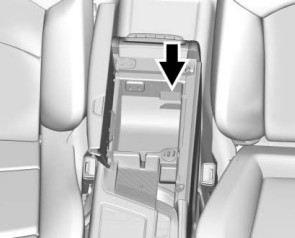
- Place the new proxfob into the transmitter pocket.
- Press the START button. When the prox is learned, the DIC will show that it is ready to program the next prox.
- Remove the prox from the pocket and press UNLOCK.
To program more, repeat Steps 3-5.
When done, press and hold the START button for 12 seconds to exit programming mode. |
 |
| Without Recognized Proxfobs |
- Turn the door lock cylinder to the unlock position 5 times within 10 seconds.
The DIC shows REMOTE LEARN PENDING, PLEASE WAIT.
- Wait 10 minutes until the DIC shows PRESS ENGINE START BUTTON TO LEARN and then press the START button.
The DIC will again show REMOTE LEARN PENDING, PLEASE WAIT.
- Repeat Step 2 two more times. After the third time, all previously known proxfobs will no longer work with the vehicle.
The DIC display should now show READY FOR REMOTE # 1.
- Place the new prox into the transmitter pocket.
- Press the START button. When the prox is learned the DIC will show that it is ready to program the next prox.
- Remove the prox from the pocket and press UNLOCK.
To program more, repeat Steps 4-6.
When done, press and hold the START button for 12 seconds to exit programming mode. |
CTS, 2008-2015 (M3N5WY7777A)
| Note: Maximum of four proxfobs. The vehicle must be off. |
| With A Recognized Prox: |
- Put the working prox in the seat or cupholder.
- Turn the door lock cylinder to the unlock position 5 times within 5 seconds.
The DIC will display Ready To Learn Electronic Key #.
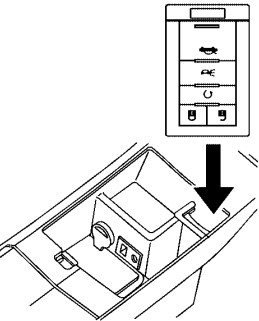
- Put the new prox into the pocket (in the center console) with the buttons facing the front of the vehicle.
- Once the prox is programmed, a beep will sound. The DIC will display Ready To Learn Electronic Key #.
- Press the ignition control knob to exit programming mode.
- Remove the prox from the pocket and press the UNLOCK button on the prox two times.
|
 |
| Without a Recognized Prox |
- Put the new prox into the pocket (in the center console) with the buttons facing the front of the vehicle.
- Turn the door lock cylinder to the unlock position 5 times within 5 seconds.
- The DIC will display PRESS START CONTROL TO LEARN KEYS. Press the Start button.
The DIC will read LEARN DELAY ACTIVE WAIT 10 MIN and will count down to zero, one minute at a time.
- Repeat Step 3 two more times.
- After the 3rd 10 minute wait, a beep will sound and the DIC shows READY TO LEARN ELECTRONIC KEY #1.
- Once the prox is programmed, a beep will sound and the DIC will display READY TO LEARN ELECTRONIC KEY #2.
- To program more, put a new prox in the pocket until you hear a beep and the DIC advances to the next key number.
- When all proxfobs have been programmed, press the Start button.
- Press the UNLOCK button on each prox to complete programming.
|
CTS, 2014-2019 (HYQ2AB)
| 2014-2016 only require 1 prox; procedure is the same |
| Note: 8 proxfobs maximum |
| With Recognized Proxfobs: |
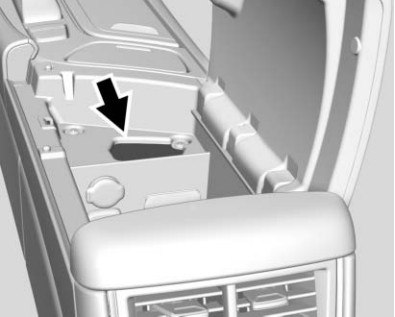
- Pocket is in the center console under the rubber mat.
- Put the known proxfobs in the cupholder.
- Turn the door lock cylinder to the unlock position 5 times within 10 seconds.
The DIC shows READY FOR REMOTE #.
- Put the new prox in the pocket.
- Press the START button. When the prox is learned, the DIC will show that it is ready for the next one.
- Remove the prox from the pocket and press UNLOCK or LOCK on the prox.
To program more, repeat Steps 4-6.
When done, press and hold the START button for approximately 12 seconds to exit programming mode.
|
 |
| Without Recognized Proxfobs: |
- Pocket is in the center console under the rubber mat.
- Turn the door lock cylinder to the unlock position 5 times within 10 seconds.
The DIC shows REMOTE LEARN PENDING, PLEASE WAIT.
- Wait 10 minutes until the DIC shows PRESS ENGINE START BUTTON TO LEARN, then press the START button.
The DIC will again show REMOTE LEARN PENDING, PLEASE WAIT.
- Repeat Step 3 two additional times.
The DIC should now show READY FOR REMOTE # 1.
- Put the new prox in the pocket.
- Press the START button. When the prox is learned, the DIC will show that it is ready for the next one.
- Remove the prox from the pocket and press UNLOCK or LOCK on the prox.
To program more, repeat Steps 5–7.
When done, press and hold the START button for approximately 12 seconds to exit programming mode.
|
ELR, 2014-2016
| Note: 8 proxfobs maximum. |
| With a Recognized Prox |
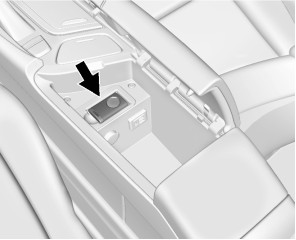
- The pocket is under the rubber mat in the center console.
- Place the known prox in the cupholder.
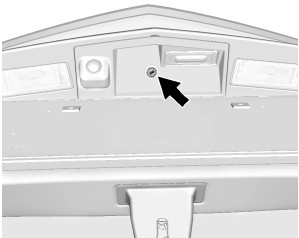
- Open the trunk with the key. (keyhole is above the license plate)
- Now, turn the key counterclockwise 5 times within 10 seconds.
The DIC shows READY FOR REMOTE KEY #.
- Place the new prox, button side down, in the pocket.
- Press the START button.
The DIC shows READY FOR REMOTE #.
- Remove the prox from the pocket and press LOCK or UNLOCK.
To program more, repeat Steps 5–7.
Press and hold the START button for at least 12 seconds to exit programming. |
Lock Location
 |
Pocket Location
 |
| Programming without a Recognized Prox |
- The pocket is under the rubber mat in the center console.
- Open the trunk with the key. (keyhole is above the license plate)
- Now, turn the key counterclockwise five times within 10 seconds.
The DIC shows REMOTE LEARN PENDING PLEASE WAIT.
- Wait for 10 minutes until the DIC shows PRESS ENGINE START BUTTON LEARN, then press the START button.
The DIC reads REMOTE LEARN PENDING, PLEASE WAIT.
- Repeat Step 4 two additional times.
The DIC display should now show READY FOR REMOTE #1.
- Place the new prox, button side down, in the pocket.
- Press the START button.
When the prox is learned, the DIC shows that it is ready to program the next.
- Remove the prox from the pocket and press LOCK or UNLOCK.
To program more, repeat Steps 6-8.
Press and hold the START button for approximately 12 seconds to exit programming.
|
Escalade, 2015-2020
| Note: 8 proxfobs Maximum. 2017+ is 2 Minimum. Same procedure. |
| With A Recognized Proxfob: |
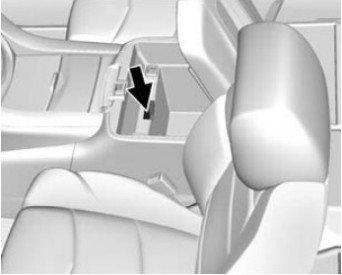
- Pocket is in the center console towards the front.
- Place the known prox in the cupholder.
- Turn the door lock cylinder to the unlock position 5 times within 10 seconds.
The DIC shows READY FOR REMOTE #.
- Place the new prox in the pocket.
- Press the START button. When the prox is learned, the DIC will show that it is ready for the next one.
- Remove the prox from the pocket and press LOCK or UNLOCK on the prox.
To program more, repeat Steps 4–6.
Press and hold the START button for approximately 12 seconds to exit programming mode. |
 |
| Without a Recognized Prox |
- Pocket is in the center console towards the front.
- Turn the door lock cylinder to the unlock position 5 times within 10 seconds.
The DIC shows REMOTE LEARN PENDING, PLEASE WAIT.
- Wait for 10 minutes until the DIC shows PRESS ENGINE START BUTTON TO LEARN, then press the START button.
The DIC display will again show REMOTE LEARN PENDING, PLEASE WAIT.
- Repeat Step 3 two additional times.
The DIC should now show READY FOR REMOTE # 1.
- Put the new prox in the pocket.
- Press the START button. When the prox is learned, the DIC will show that it is ready for the next one.
- Remove the prox from the pocket and press LOCK or UNLOCK on the prox.
To program more, repeat Steps 5–7.
When done, press and hold the START button for approximately 12 seconds to exit programming mode. |
SRX, 2010-2014
| Note: 8 proxfobs Maximum |
| With A Recognized Prox: |
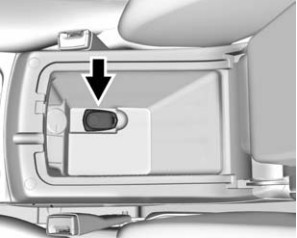
- Pocket is under the tray in the center console.
- Place the known prox in the cupholder.
- Turn the door lock cylinder to the unlock position 5 times within 10 seconds.
The DIC shows READY FOR REMOTE #.
- Place the new prox in the pocket.
- Press the START button. When the prox is learned, the DIC will show that it is ready for the next one.
- Remove the prox from the pocket and press UNLOCK on the prox.
To program more, repeat Steps 4-6.
Press and hold the START button for 12 seconds to exit programming mode.
|
 |
| without a Recognized Prox |
- Pocket is under the tray in the center console.
- Turn the door lock cylinder to the unlock position 5 times within 10 seconds.
The DIC shows REMOTE LEARN PENDING, PLEASE WAIT.
- Wait for ten minutes until the DIC shows PRESS ENGINE START BUTTON TO LEARN and then press the START button.
The DIC display will again show REMOTE LEARN PENDING, PLEASE WAIT.
- Repeat Step 2 two additional times.
The DIC should now show READY FOR REMOTE # 1.
- Put the new prox in the pocket.
- Press the START button. When the prox is learned, the DIC will show that it is ready for the next one.
- Remove the prox from the pocket and press UNLOCK on the prox.
To program more, repeat Steps 5–7.
Press and hold the START button for 12 seconds to exit programming mode.
|
STS, 2004-2011
| Note: The vehicle must be off. 4 Proxfobs Maximum. |
| With a Recognized Prox |
- Have the recognized prox and the new prox with you.
- Turn the door lock cylinder to the unlock position 5 times within 5 seconds.
The DIC shows READY FOR FOB #.
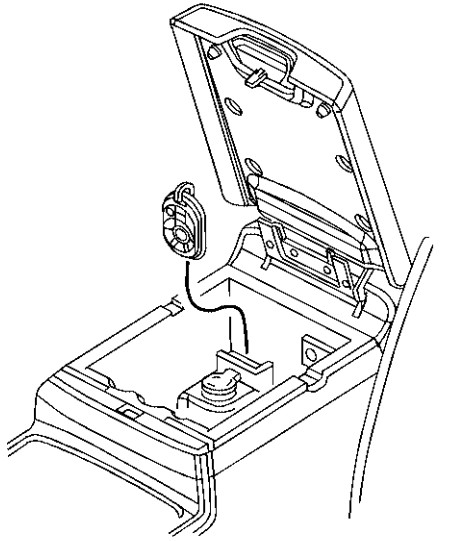
- Put the new prox into the pocket, buttons facing the front of the vehicle.
- Once the prox is programmed, a beep will sound and the DIC will show READY FOR #.
- Remove the prox from the pocket and press UNLOCK on the prox 2 times.
To program more, repeat Steps 3-5.
When you are done, press the UNLOCK button on each prox twice. |
 |
| Without a Recognized Prox |
- Put the new prox into the pocket, buttons facing the front of the vehicle.
- Turn the door lock cylinder to the unlock position 5 times within 5 seconds.
- The DIC shows OFF-ACCESSORY TO LEARN. Press the OFF/ACC button.
The DIC shows WAIT 10 MINUTES and will count down to zero, one minute at a time.
- Repeat Step 3 two additional times.
- A beep will sound and the DIC shows READY FOR FOB #1.
- Once the prox is programmed, a beep will sound and the DIC shows READY FOR FOB #2. Remove the prox and press the UNLOCK button twice.
To program more, place the next prox into the pocket and repeat step 6.
When you are done, press the UNLOCK button on each prox twice. |
XLR, 2004-2009
| Note: 4 proxfobs maximum. |
| With a Recognized Prox |
- Put the recognized prox on the console.
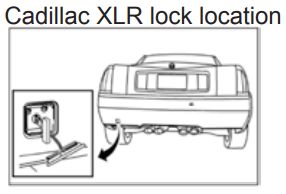
- Open the trunk with the key, then turn the key in the lock 5 times within 5 seconds.
The DIC shows READY FOR FOB #.
- Put the new prox in the glove box pocket with the buttons facing the passenger side.
- A beep sounds once programming is complete.
To program more, repeat Step 3.
Press ACC on the ignition button to exit programming mode. |
 | XLR Pocket Location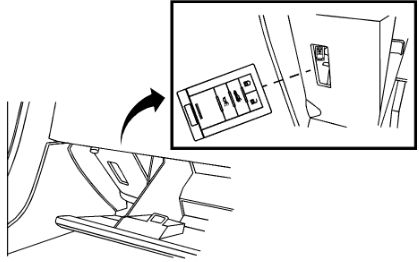 |
| Without a Recognized Prox |
- Put the new prox in the glove box pocket with the buttons facing the passenger side.
- Open the trunk with the key, then turn the key in the lock 5 times within 5 seconds.
- The DIC will display OFF-ACC TO LEARN; press ACC on the ignition button.
The DIC shows WAIT 10 MINUTES and will count down to zero.
- Repeat Step 3 two additional times.
- A beep will sound and the DIC will display READY FOR FOB #1.
- Once the prox is programmed, a beep will sound and the DIC will show READY FOR #.
To program more, place the next prox into the pocket and repeat step 6.
Press ACC on the ignition button to exit programming mode. |
XT4, 2019-2024
| Note: Maximum 8 proxfobs. |
| With Recognized Proxfobs |
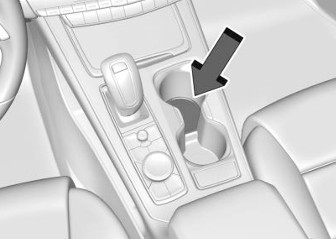
- Recognized proxfobs in the front cupholder.
- Turn the door lock cylinder to the unlock position 5 times within 10 seconds.
The DIC shows READY FOR REMOTE #.
- Place the new prox in the front cupholder.
- Press the START button. When the prox is learned, the DIC will show that it is ready to program the next prox.
- Remove the prox from the cupholder and press LOCK or UNLOCK.
To program more, repeat Steps 3-5.
When done, press and hold the START button for 12 seconds to exit programming. |
 |
| Without Recognized Proxfobs |
- Turn the door lock cylinder to the unlock position 5 times within 10 seconds.
The DIC shows REMOTE LEARN PENDING, PLEASE WAIT.
- Wait 10 minutes until the DIC shows PRESS ENGINE START BUTTON TO LEARN and then press the START button.
The DIC will again show REMOTE LEARN PENDING, PLEASE WAIT.
- Repeat Step 2 two additional times. The DIC display should now show READY FOR REMOTE # 1.
- Place the new prox into the pocket in the front cupholder.
- Press the START button. When the prox is learned the DIC will show that it is ready to program the next prox.
- Remove the prox from the cupholder and press LOCK or UNLOCK.
To program more, repeat Steps 4-6.
When done, press and hold the START button for 12 seconds to exit programming. |
XT5, 2017-2025
| Note: 8 proxfobs Maximum |
| With Recognized Proxfobs: |
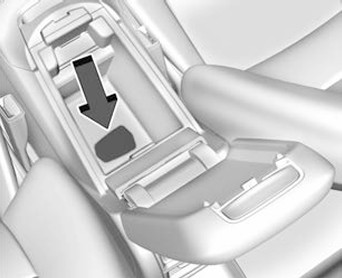
- Pocket is under the tray in the center console.
- Put the known proxfobs in the cupholder.
- Turn the door lock cylinder to the unlock position 5 times within 10 seconds.
The DIC shows READY FOR REMOTE #.
- Place the new prox in the pocket.
- Press the START button. When the prox is learned, the DIC will show that it is ready for the next one.
- Remove the prox from the pocket and press LOCK or UNLOCK on the prox.
To program more, repeat Steps 4-6.
Press and hold the START button for 12 seconds to exit programming mode.
|
 |
| without Recognized Proxfobs |
- Pocket is under the tray in the center console.
- Turn the door lock cylinder to the unlock position 5 times within 10 seconds.
The DIC shows REMOTE LEARN PENDING, PLEASE WAIT.
- Wait for ten minutes until the DIC shows PRESS ENGINE START BUTTON TO LEARN and then press the START button.
The DIC display will again show REMOTE LEARN PENDING, PLEASE WAIT.
- Repeat Step 2 two additional times.
The DIC should now show READY FOR REMOTE # 1.
- Put the new prox in the pocket.
- Press the START button. When the prox is learned, the DIC will show that it is ready for the next one.
- Remove the prox from the pocket and press LOCK or UNLOCK on the prox.
To program more, repeat Steps 5–7.
Press and hold the START button for 12 seconds to exit programming mode.
|
XT6, 2020-2025
| Note: 8 proxfobs Maximum |
| With Recognized Proxfobs: |
- Pocket is under the tray in the center console.
- Put the known proxfobs in the cupholder.
- Turn the door lock cylinder to the unlock position 5 times within 10 seconds.
The DIC shows READY FOR REMOTE #.
- Place the new prox in the pocket.
- Press the START button. When the prox is learned, the DIC will show that it is ready for the next one.
- Remove the prox from the pocket and press LOCK or UNLOCK on the prox.
To program more, repeat Steps 4-6.
Press and hold the START button for 12 seconds to exit programming mode.
|
|
| without Recognized Proxfobs |
- Pocket is under the tray in the center console.
- Turn the door lock cylinder to the unlock position 5 times within 10 seconds.
The DIC shows REMOTE LEARN PENDING, PLEASE WAIT.
- Wait for ten minutes until the DIC shows PRESS ENGINE START BUTTON TO LEARN and then press the START button.
The DIC display will again show REMOTE LEARN PENDING, PLEASE WAIT.
- Repeat Step 2 two additional times.
The DIC should now show READY FOR REMOTE # 1.
- Put the new prox in the pocket.
- Press the START button. When the prox is learned, the DIC will show that it is ready for the next one.
- Remove the prox from the pocket and press LOCK or UNLOCK on the prox.
To program more, repeat Steps 5–7.
Press and hold the START button for 12 seconds to exit programming mode.
|
XTS, 2013-2019
| Note: Maximum 8 proxfobs. |
| With a Recognized Prox |
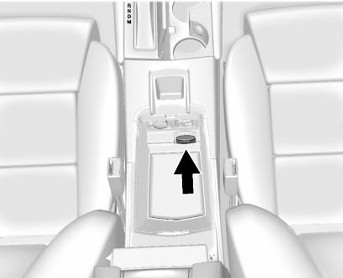
- Pocket is in the center console under the tray.
- Put the known prox in the pocket.
- Turn the door lock cylinder to the unlock position 5 times within 10 seconds.
The DIC shows READY TO LEARN ELECTRONIC KEY #.
- Remove the known prox and put the new prox in the pocket.
- Press the START button. When the prox is learned, the DIC will show that it is ready for the next one.
- Remove the prox from the pocket and press UNLOCK or LOCK on the prox.
To program more, repeat Steps 4-6.
When done, press and hold the START button for approximately 12 seconds to exit programming mode.
|
 |
| Without Recognized Proxfobs: |
- Pocket is in the center console under the tray.
- Turn the door lock cylinder to the unlock position 5 times within 10 seconds.
The DIC shows REMOTE LEARN PENDING, PLEASE WAIT.
- Wait 10 minutes until the DIC shows PRESS ENGINE START BUTTON TO LEARN, then press the START button.
The DIC will again show REMOTE LEARN PENDING, PLEASE WAIT.
- Repeat Step 3 two additional times.
The DIC should now show READY FOR REMOTE # 1.
- Put the new prox in the pocket.
- Press the START button. When the prox is learned, the DIC will show that it is ready for the next one.
- Remove the prox from the pocket and press UNLOCK or LOCK on the prox.
To program more, repeat Steps 5–7.
When done, press and hold the START button for approximately 12 seconds to exit programming mode.
|
GM 1
| Note: Eight remotes maximum |
| With the DIC: |
Turn ignition ON
Press DIC info button to:
· PRESS TO RELEARN REMOTE KEY
Press DIC Checkmark to:
· REMOTE KEY LEARNING ACTIVE
Press & hold LOCK & UNLOCK together
· (about 15 seconds, soft chirp for success)
Repeat step 4 for additional fobs, if any
Turn ignition OFF to exit programming
|
| Without the DIC: |
Turn ignition ON
Press the odometer reset to:
· RELEARN REMOTE KEY
Press & hold odometer reset button to:
· REMOTE KEY LEARNING ACTIVE
Press & hold LOCK & UNLOCK together
· (about 15 seconds, soft chirp for success)
Repeat for additional fobs, if any
Turn ignition OFF to exit programming
|
| End 1 |
GM 2
Close all doors, key in the ignition
Hold down the door UNLOCK switch
Quickly turn the ignition ON, OFF, ON, OFF.
Release the UNLOCK switch (locks should cycle)
· If locks begin to cycle before you release the switch, wait to release it until after locks cycle
Press & hold LOCK & UNLOCK togather
· (about 30 seconds, until locks cycle)
Repeat for additional fobs, if any
Turn ignition ON to exit programming
|
| End 2 |
GM 10
| OBP Method GM 10 |
| Note: A maximum of 2 remotes may be programmed into these vehicles. |
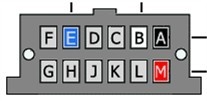 |
- Locate the Data Link Connector (DLC) underneath the driver's side dashboard. If there is a terminal in cavity G, then the vehicle is equipped with factory keyless entry.
Connect cavity G to a ground using a fused jumper wire. The locks will cycle within 2 seconds.
- Press the UNLOCK button on remote. The locks will cycle to indicate successful programming. Repeat for additional remotes, if any.
- Remove jumper wire and test remote(s).
|
|